

The tax deadline is close. You sit down, type your password and press enter. Then you see it: “Invalid login.” You try again. Same thing. You wait for your OTP, but it never arrives. If this sounds like you, don’t worry. Many South Africans get stuck on the SARS eFiling login page every year. The good news is that most problems are easy to fix.
In this guide, you’ll learn how to log in step by step, what to do if you forget your password or username, and how to fix common login problems. I’ll also share the one mistake that locks out more people than a forgotten password. It might be the reason you’re stuck right now.
What Is SARS eFiling?
SARS eFiling is a free website from the South African Revenue Service. It’s like a SARS office that’s open all day, every day.
On eFiling, you can file your SARS tax return, check your refund, pay tax and download your tax documents. You don’t need to stand in a queue.
That’s why your login matters. Almost everything about your tax is behind one username and password. If you can’t log in, you can’t do anything else.
What You Need Before You Log In
Get these ready before your SARS login:
- Your eFiling username and password.
- The phone number or email linked to your profile. SARS sends your one-time PIN (OTP) here.
- Your ID number and tax number. You’ll need these if you have to recover your account.
- Good internet. A weak signal can cut you off while you enter your OTP.
- An updated browser. Old browsers may not load eFiling properly.
Remember the second point. It’s more important than it looks. We’ll come back to it soon.
How to Log In to SARS eFiling (Step-by-Step)
On a computer
- Go to the official eFiling website. Use a bookmark if you have one. (The security section explains why.)
- Click “Login”. It’s usually at the top of the page.
- Enter your username and password. Make sure caps lock is off.
- Enter your OTP. SARS sends it to your phone or email. Enter it quickly, because it expires.
- You’re in. You’ll see your dashboard. Check that your details are still correct.
On the SARS MobiApp
The SARS MobiApp login uses the same username and password as the website.
- Download the SARS MobiApp from the Google Play Store or Apple App Store. Make sure SARS is the publisher.
- Open the app and tap Login.
- Enter your username and password.
- Enter your OTP.
The app is great for quick jobs, like checking your refund. For bigger tasks with many documents, a computer is easier.
First time? Register first
If you’ve never used eFiling, you need to register with SARS. Click Register on the homepage and follow the steps. You’ll need your ID number, tax number and contact details.
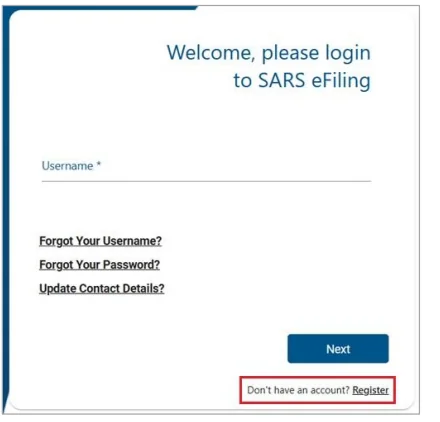
Note: having a tax number doesn’t mean you’re registered on eFiling. They are two different things. When your SARS eFiling register step is done, follow the login steps above.
Forgot Your SARS eFiling Username or Password?
This happens to many people. Most of us only log in once a year, so it’s easy to forget.
Reset your password
- On the login page, click Forgot Password.
- Enter your username and the details SARS asks for.
- Enter the OTP sent to your phone or email.
- Create a new password that is strong and easy for you to remember.
The SARS eFiling forgot password process usually takes just a few minutes.
Get your username back
Click Forgot Username on the login page. SARS will check who you are, usually with your ID or tax number. Then it sends your username to your email or phone.
If the online way doesn’t work
Sometimes it won’t work, for example if your details at SARS no longer match. Then you should:
- Call the SARS Contact Centre on 0800 00 7277, or
- Book a visit at a SARS branch and take your ID.
This takes more time, but it keeps your account safe. It stops scammers from changing your details.
Common SARS eFiling Login Problems (and How to Fix Them)
Remember the mistake I mentioned at the start? It’s this: an old cellphone number.
People change numbers or lose phones and forget to tell SARS. Then, at tax time, the OTP goes to the old number. The password is fine, but they still can’t log in.
So if your SARS OTP is not received, check your number first. Here are other common SARS eFiling login problems and how to fix them:
| Problem | Why it happens | What to do |
|---|---|---|
| OTP not received | Old number, slow network or SMS blocked | Wait, resend, check spam, then update your number with SARS |
| Account locked | Too many wrong passwords | Reset your password or contact SARS |
| “Invalid login” | Wrong username, caps lock on, or tax number used by mistake | Recover your username and type carefully |
| Page won’t load | Busy site, old browser or saved data | Clear your cache, try another browser or log in later |
| Session timed out | You were inactive too long | Log in again and save often |
| App keeps crashing | Old app version | Update or reinstall the MobiApp |
Tip: if it doesn’t work after three tries, stop. Too many wrong tries can lock your account.
How to Keep Your SARS eFiling Login Secure
This part is very important. Scammers make fake login pages that look like the real eFiling site. If you enter your details there, they can get into your account. Some even change your bank details and take your refund.
How to stay safe:
- Type sarsefiling.co.za into your browser yourself. Never log in from a link in an email or SMS.
- Check the web address. Look for the right spelling and the padlock icon.
- Use a strong password just for eFiling. Don’t use your email or bank password.
- Never share your OTP. SARS will never ask for it.
- Log out when you’re done, especially on a shared computer.
- Report fake emails to [email protected].
If something looks strange, close the page and use your bookmark instead.
What You Can Do After Logging In
After you log in, you can:
- File your tax return (ITR12) or accept your auto-assessment.
- Check your refund.
- See your statement of account.
- Download your assessment (ITA34) and old tax documents.
- Request a Tax Compliance Status (TCS) PIN.
- Update your personal and bank details.
- Upload documents when SARS asks for them.
- Lodge a dispute if you think your assessment is wrong.
Not sure where to start? Check your statement of account first. It shows if anything needs your attention.
SARS eFiling Login for Tax Practitioners and Businesses
eFiling works a little differently for tax practitioners and businesses.
Tax practitioners register as practitioners. This lets them look after many clients from one login. It saves time, but it also makes the login a target for scammers, so keep it extra safe.
Businesses register an organisation profile. This lets the company handle VAT, PAYE and company tax online. The main user, usually the public officer, can give access to others, like a bookkeeper.
Simple rules to follow:
- Give each person their own login. Never share one.
- Only give people the access they need.
- Remove access when someone leaves. This is easy to forget.
- Keep the public officer’s details up to date. Tell SARS if that person changes.
Tips for a Smooth Login During Tax Season
eFiling gets very busy during tax season. These tips will help:
- Log in early. Don’t wait for the last week.
- Update your details before tax season. Check your phone number and email a month or two before.
- Log in at quiet times. Early morning or late evening works best.
- Bookmark the real site. Save sarsefiling.co.za in your browser.
- Keep your username safe. A password manager is a good idea.
- Have your documents ready. Keep your IRP5 and certificates close by.
If you do just the first two, you’ll avoid most login problems.
Frequently Asked Questions
Is SARS eFiling login free?
Yes, it’s free. If a website asks you to pay to log in, it’s a scam.
Can I log in to SARS eFiling from outside South Africa?
Yes. You just need internet and a way to get your OTP on your registered number or email.
What should I do if I entered my details on a fake SARS site?
Act fast. Change your password, check your bank details, contact SARS and send the fake message to [email protected].
Can I have more than one eFiling profile?
Most people need only one. Businesses and tax practitioners use separate profiles for work.
Does SARS eFiling work on a Mac or tablet?
Yes. It works on any updated browser. On a tablet, the MobiApp is often easier.
Is my tax number the same as my eFiling username?
No. SARS gives you your tax number. You choose your username when you register.
Can someone else log in for me?
A registered tax practitioner can help through their own profile. Never share your password with anyone.
Conclusion
The SARS eFiling login doesn’t have to be stressful. Most problems come from three things: a forgotten password, an old phone number or a busy website. Now you know how to fix each one.
Remember this: a few minutes of preparation before tax season can save you hours of stress later.