
You filed your SARS tax return. SARS says it owes you money. Great! But days pass, and the money still isn’t in your account.
So you keep checking eFiling. You keep checking your bank app. Sound familiar? You’re not alone. Many South Africans feel this way every tax season.
Here’s the good news: in most cases, nothing is wrong. Your refund is just going through a few steps. But sometimes there is a real problem, and it helps to spot it early.
This guide will show you how to check your SARS refund status, what each status means, why refunds get delayed, and what you can do about it. Don’t skip the part about scams. There’s one trick that fools people every year.
SARS Tax Refund Status Guide
Pick the status you see on eFiling and we will explain what it means and what to do next. Guidance only — not a live lookup.
What Is a SARS Refund?
A SARS refund is money that SARS pays back to you because you paid too much tax during the year.
If you earn a salary, your employer takes tax from your pay every month. This is called PAYE (Pay-As-You-Earn). It’s only an estimate. When you file your tax return, SARS works out how much tax you really owe. These things can change the amount:
- Medical aid and medical costs
- Retirement annuity payments
- Travel for work
- Income from more than one job
- Other deductions
If you paid more than you owe, SARS gives you the extra back. That’s your refund.
You can see this on your ITA34, which is your notice of assessment. It shows if you owe SARS, if SARS owes you, or if you’re even. Read it carefully. If something seems wrong later, this is the first place to look.
Remember, a refund is your own money. It’s fair to want it back quickly.
How Long Does a SARS Refund Take?
This is the question most people ask.
If your return is simple and SARS doesn’t need extra checks, you’ll usually get your refund within about 72 hours (three working days) after your assessment.
But some returns take longer. Here’s a rough guide to how long a SARS refund takes:
| Situation | Usual time |
|---|---|
| Simple return, no checks | About 72 hours after assessment |
| You accepted an auto-assessment | A few working days |
| SARS asked for documents | Often 21 working days or more after you send them |
| Your return is being audited | A few weeks to a few months |
| SARS is checking your bank details | On hold until the check is done |
These are normal times, not promises.
So when will SARS pay you? It depends on your situation. The next section shows you how to find out.
How to Check Your SARS Refund Status
There are a few ways to check your SARS refund status. eFiling is the best place to start.
Option 1: Check on SARS eFiling
- Log in to SARS eFiling.
- Click Returns, then Returns History.
- Choose the tax year, for example 2026.
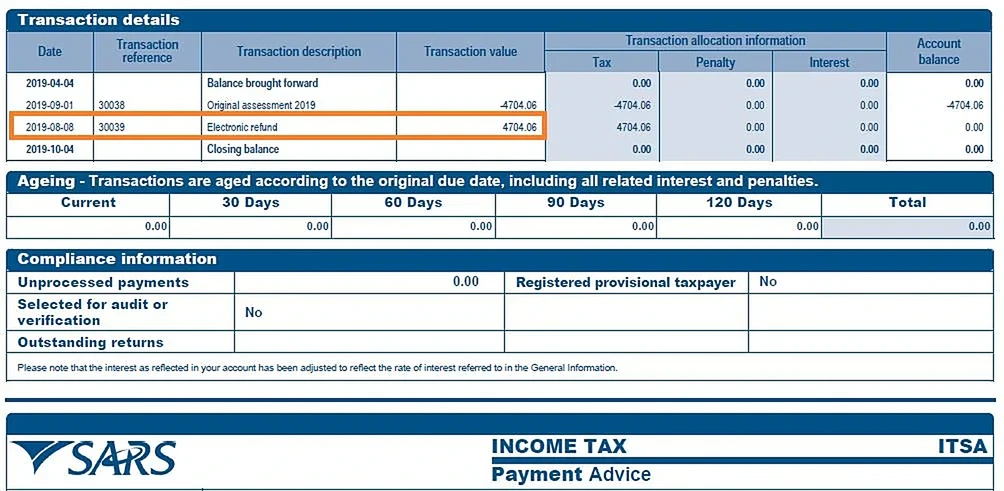
- Check the status of your return and open your Statement of Account (ITSA).
- Check SARS Correspondence for any letters from SARS.
The Statement of Account is the most useful page. It shows how much SARS owes you and if it has been paid. If you see a payment, your money is on the way.
Option 2: Use the SARS MobiApp
You can log in to the SARS MobiApp with your eFiling details. It lets you check your refund on your phone.
Option 3: Check without eFiling
Don’t use eFiling? You can:
- Call SARS on 0800 00 7277. Have your ID number and tax number ready.
- Book a visit to a SARS branch online.
- Ask your tax practitioner to check for you.
Tip: phone lines are very busy during tax season. eFiling or the app is usually faster.
Understanding What Your Refund Status Means
Words like “verification” or “audit” can sound scary. Don’t worry. Here’s what the most common statuses mean:
| Status | What it means | What to do |
|---|---|---|
| Filed / Submitted | SARS has your return | Wait for your assessment |
| Assessed (ITA34 issued) | SARS has worked out your tax | Read your ITA34 and Statement of Account |
| Refund in progress / payment pending | Your refund is on the way | Wait a few working days |
| Verification / documents requested by SARS | SARS wants proof of something | Upload the documents quickly |
| Audit / under review | SARS is checking your return more closely | Answer every letter on time |
| Bank details being checked | SARS needs to confirm your account | Follow the steps in your SARS letter |
| Refund paid | SARS has sent the money | Check your bank in a day or two |
“Verification” is normal. SARS checks many returns every year, some at random. It doesn’t mean you did something wrong. SARS just wants to see proof.
Why Is My SARS Refund Delayed? (Common Reasons)
Why is your SARS refund taking so long? Usually, it’s one of these reasons:
- SARS wants documents. This is called verification. SARS may ask for medical certificates, retirement annuity certificates or a travel logbook. Your refund waits until you send them.
- You have a missing tax return. SARS usually won’t pay a refund if any old return isn’t filed, even one from years ago.
- You owe SARS money. SARS can use your refund to pay other tax you owe.
- Your bank details need checking. New or changed bank details mean extra security checks.
- Your return is being audited. An audit takes longer than verification.
- Your numbers don’t match. If your IRP5 from work doesn’t match your return, SARS will wait until it’s fixed.
- SARS is very busy. During tax season, SARS handles millions of returns.
The good news is that most of these reasons show up on your eFiling profile.
What to Do If Your SARS Refund Is Delayed
If your refund is late, follow these steps:
- Check your SARS Correspondence. Look for letters asking for documents. The answer is often there.
- Send what SARS asked for. Upload your documents on eFiling. Make sure they are clear and complete.
- Check your Statement of Account. See if your refund paid off another tax debt or was already paid.
- File any missing returns. This fixes many delayed refunds.
- Check your bank details. If they’re wrong, see the next section.
- Contact SARS. Call the Contact Centre or send a query on eFiling. Save every reference number.
- Escalate if needed. You can complain to SARS’s complaints office. If that doesn’t help, contact the Office of the Tax Ombud.
Tip: write down dates, reference numbers and who you spoke to. It helps if you need to escalate.
How to Update Your Banking Details With SARS
Changed banks? Then you need to update your details with SARS. If you don’t, your refund may bounce or get stuck.
Here’s how:
- Log in to eFiling and open your profile or the RAV01 form (Registration, Amendments and Verification).
- Update your bank details.
- Submit and follow the steps. SARS may ask you to upload documents or confirm who you are.
- Visit a branch if SARS asks. Bring your ID and proof of your bank account.
Have these ready:
- Your ID or passport
- A recent bank statement or a stamped letter from your bank (usually not older than three months)
- Proof of address, if SARS asks
Important: the account must be in your name. SARS usually won’t pay your refund into someone else’s account.
The steps can change, so check the SARS website before you start.
How to Avoid SARS Refund Delays in the Future
You can’t control SARS. But you can do a lot to avoid delays:
- File every year. One missing return can hold up your refund.
- Keep your documents together. Save medical receipts, retirement annuity certificates, IRP5s and travel logs in one place.
- Check your auto-assessment. It may miss deductions you can claim. Fix it before you accept it.
- Compare your IRP5 with your payslips. Fix mistakes before you file.
- Keep your phone number and email up to date. That way you won’t miss SARS messages.
- Reply to SARS quickly. Your refund won’t move until you do.
- Only claim what you can prove. False claims lead to audits and penalties.
People who get their refunds fast aren’t lucky. They’re just organised.
Beware of SARS Refund Scams
Here’s the trick I mentioned at the start.
You’re waiting for your refund. Then you get a message: “SARS: Your refund of R4,850 is ready. Click here to confirm your bank details.” It has the SARS logo. It looks real. So you click.
That’s the scam. The link goes to a fake website. It steals your bank details or your eFiling password.
Warning signs:
- A link asking you to “claim” your refund. SARS doesn’t send links asking for bank details.
- Requests for your PIN, password or OTP. SARS never asks for these.
- Pressure to act fast, like “reply in 24 hours or lose your refund.”
- Attachments you didn’t expect.
- Strange email addresses or spelling mistakes.
How to stay safe:
- Type the eFiling address into your browser yourself. Don’t use links in messages.
- Only check your refund on eFiling, the SARS MobiApp or by calling SARS.
- Report fake messages to SARS. The SARS website shows you how.
- If you clicked a fake link, change your eFiling password and call your bank right away.
Scammers know you’re waiting for your money. Stop and think before you click.
Frequently Asked Questions
How long does SARS take to pay a refund?
For a simple return, about three working days after assessment. It takes longer if SARS asks for documents or does an audit.
Is verification the same as an audit?
No. Verification is a quick check of a few things. An audit is a bigger check and takes longer.
Can I speed up my SARS refund?
You can help by filing missing returns, sending documents quickly and keeping your bank details up to date.
Can I check my SARS refund status by phone?
Yes. Call the SARS Contact Centre. Have your ID number and tax number ready.
Does SARS pay refunds on weekends?
Refunds usually show up on weekdays. If SARS pays on a Friday, you may only see it next week.
Why is my SARS refund smaller than I expected?
SARS may have used part of it to pay other tax you owe, or changed your assessment. Check your ITA34 and Statement of Account.
What if my refund went to a closed bank account?
The money usually goes back to SARS. Update your bank details, and SARS can pay it again.
Does SARS pay interest on late refunds?
Sometimes, yes. But usually not if the delay was your fault, like missing returns or documents. A tax practitioner can tell you more.
Conclusion
Waiting for a SARS refund can be stressful. After all, it’s your money. But now you know what to do. You know how to check your status, what each status means, and how to fix most delays. And remember: never click a link in a message to “claim” your refund. File on time, keep your documents organised and reply to SARS quickly. Do this, and your next refund could arrive in just a few days.