

Did someone just ask you for your tax number? Maybe you started a new job. Maybe you sell things online, or you just opened a small business. Now you’re wondering: am I registered with SARS?
Don’t worry. Many people feel unsure about SARS at first.
The good news is that SARS registration is easy. You only need your phone, a few documents, and less than an hour. You can register for SARS eFiling from home. Most problems come from small mistakes, not from the system itself.
In this guide, you’ll learn what SARS registration is, who needs it, what documents to get ready, and how to register step by step. We also cover businesses, employers, and common mistakes.
One more thing: many people already have a SARS tax number and don’t know it. Keep reading to find out if that’s you.
SARS Registration Checklist
Tick each document as you get it ready. Get your documents ready before you start — it stops your registration from getting stuck halfway.
0 of 6 ready
Tick each document as you get it ready. Your bank account must be in your own name.
What Is SARS Registration?
SARS registration means signing up as a taxpayer with the South African Revenue Service. After you register, SARS gives you a 10-digit income tax reference number. This is your tax number. You use it for all your tax matters.
“SARS registration” can mean two different things:
- Registering as a taxpayer. This gives you a tax number.
- Registering for SARS eFiling. This gives you an online account. You use it to file returns, see statements, and contact SARS.
These two are linked, but they are not the same. Some people have a tax number but no eFiling account. If you sign up for eFiling and don’t have a tax number yet, eFiling can register you for income tax at the same time.
So, being “registered with SARS” usually means two things: you have a tax number, and you can log in to eFiling. It’s best to have both.
Some people also need to register for other taxes, like VAT, PAYE, UIF, SDL, or provisional tax. We explain these below.
Who Needs to Register with SARS?
More people need to register than you might think.
You usually need to register as a taxpayer if you:
- Earn a salary above the yearly tax threshold. For the 2025/26 tax year, it was R95,750 for people under 65. This amount can change each year, so check the latest figure.
- Work for yourself, such as freelancers, tutors, drivers, content creators, or anyone with a side business.
- Earn rent from a house, flat, or room.
- Earn interest or investment income above the tax-free amount.
- Get paid by more than one employer in the same year.
- Own a company, close corporation, or trust.
- Have employees. You must also register as an employer for PAYE.
- Have sales above the VAT threshold.
My tip: even if you earn below the threshold, register anyway. Banks, landlords, and clients often ask for a tax number. Not having one can delay a loan or a payment. Registering is free and saves you trouble later.
Also, if you had a formal job before, your employer may have already registered you. We’ll show you how to check soon.
Why SARS Registration Is More Important in 2026
In the past, some people earned extra money without SARS knowing. Today, that is much harder. I think this is a good thing for honest taxpayers.
Here’s what has changed:
- SARS gets more information. Banks, employers, medical aids, retirement funds, and investment apps all share data with SARS. If you earn money, SARS can probably see it.
- Auto-assessments are common. SARS now fills in tax returns for many people. This only works well if your details are correct. If they’re wrong, you could miss a refund.
- Side income is being checked. SARS has said clearly that money from freelancing and online selling is taxable. It’s better to register yourself than to be found later.
- Penalties add up. If you miss a tax return, you get a penalty every month. It grows fast.
- You need proof you’re compliant. A SARS Tax Compliance Status (TCS) PIN is needed for tenders, many contracts, some funding, and emigrating. You can’t get one without registering.
In short, not registering is the bigger risk in 2026.
Documents You Need Before Registering
Get your documents ready before you start. This saves time and stops your registration from getting stuck halfway.
You’ll need:
| Document | Individuals | Businesses | Tip |
|---|---|---|---|
| South African ID or smart ID card | Yes | Yes (for directors or public officer) | Foreigners can use a valid passport |
| Proof of address | Yes | Yes (business address) | Not older than 3 months, like a municipal bill, bank statement, or lease |
| Bank account proof | Yes | Yes | A stamped bank letter or bank statement in your name |
| Cellphone number and email | Yes | Yes | Must be your own, because SARS sends OTPs here |
| CIPC documents | No | Yes | Company registration certificate (COR 14.3) |
| Proof of income or contracts | Sometimes | Sometimes | Useful if you’re self-employed or registering for VAT |
Important: your bank account must be in your own name. SARS will not pay your refund into someone else’s account, not even a family member’s.
How to Register with SARS (Step-by-Step)
There are three ways to register with SARS: online on eFiling, on the SARS MobiApp, or at a SARS branch. Online is the fastest, so we’ll start there.
Option 1: SARS eFiling registration (online)
- Go to the SARS eFiling website. Type sarsefiling.co.za into your browser.
- Click “Register”. Choose “individual”. If you’re a tax practitioner or an organisation, choose that option.
- Enter your details. Add your ID number, full names, and contact details. Type them exactly as they appear on your ID.
- Create a username and password. Use a strong password and keep it safe.
- Enter the OTP. SARS sends a one-time PIN to your phone or email. Enter it quickly, as it expires.
- Register for income tax if needed. If you don’t have a tax number, eFiling will help you register for income tax.
- Add your address and bank details. SARS may ask you to upload proof of your bank account.
- Submit. Many people get a tax number right away. If SARS needs more checks, it can take a few working days.
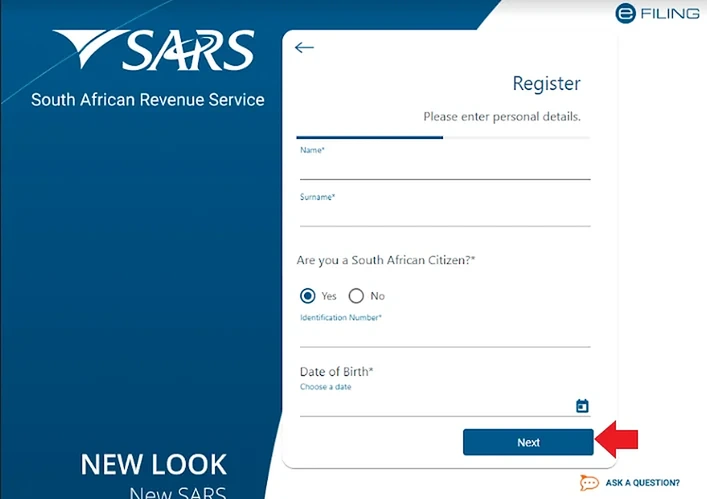
Option 2: The SARS MobiApp
The SARS MobiApp works like the eFiling website. It’s a good choice if you prefer your phone. Download the official app from the Google Play Store or Apple App Store, then tap “Register”.
Option 3: At a SARS branch
If you can’t register online, or SARS asks to see you, go to a SARS branch. Book an appointment online first, as branches often don’t help walk-ins. Take your original ID, proof of address, and bank proof.
Tip: if online registration fails, the reason is usually a small spelling mistake. Make sure your details match your ID and bank records.
SARS Registration for Companies and Businesses
When you register a company with CIPC (the Companies and Intellectual Property Commission), it is usually registered for income tax automatically. CIPC sends the details to SARS, and SARS gives the company a tax number. So don’t apply again, or you may end up with two records.
You still need to do these things yourself:
- Add the company to eFiling. A director or the registered representative signs up on eFiling and adds the company.
- Choose a registered representative. This is the person who deals with SARS for the company. You may need to upload documents or visit a branch.
- Register for VAT, if needed:
- Compulsory when your sales go over the VAT threshold in any 12 months. It was R1 million for many years, and recent Budgets proposed raising it. Check the current amount.
- Voluntary when your sales pass a lower amount (in the past, R50,000). This can help if your customers are VAT-registered businesses.
- Provisional tax. Companies must file IRP6 returns twice a year.
Sole proprietors don’t get a separate business tax number. You add your business income to your personal tax return. You’ll most likely need to register for provisional tax too.
My advice: VAT is where many small businesses struggle. Registering is easy, but keeping good records takes work. If you’re close to the threshold, speak to a registered tax practitioner first.
How Employers Can Register Employees for Tax
If you have employees, there are two parts. First, you register yourself as an employer. Then, you register your employees as taxpayers.
Step 1: Register as an employer
You must register for PAYE (Pay-As-You-Earn) within 21 business days after you start paying an employee who earns above the tax threshold. Use eFiling or visit a branch, and fill in the EMP101e form. You can also register for:
- UIF (Unemployment Insurance Fund). SARS collects this for most employers.
- SDL (Skills Development Levy). This applies if your total yearly payroll will be more than R500,000.
Step 2: Register your employees for income tax
Employers can register their employees for income tax on eFiling. You can do it one by one or for many employees at once. Each employee then gets a tax number, which appears on their IRP5.
This is why many people already have a tax number without knowing it. If you had a formal job, your employer may have registered you.
Step 3: Stay up to date
- Send the EMP201 every month and pay PAYE, UIF, and SDL on time.
- Send the EMP501 twice a year.
- Give each employee an IRP5/IT3(a) at the end of the tax year.
Tip: late EMP201s often lead to penalties. Set a monthly reminder on your phone.
How to Check If You Already Have a SARS Tax Number
Always check before you register. If you register twice, you may get two records, and fixing that takes a long time.
Here’s how to find your SARS tax number:
- Look at an old IRP5 or payslip. Your tax number is often printed there.
- Start registering on eFiling or the MobiApp. Enter your ID number. If you already have a tax number, the system will usually find it.
- Use the SARS SMS service. SARS has offered a service where you SMS “TRN” and your ID number to 47277 to get your tax number. Check the SARS website for the current format.
- Call the SARS Contact Centre on 0800 00 7277.
- Ask your employer or payroll office.
No tax number found? Then you’re not registered yet. Go back to the step-by-step guide and register.
Common SARS Registration Mistakes to Avoid
These are the mistakes people make most often. Avoid them and your registration will go much more smoothly.
- Registering twice. Check for an existing tax number first.
- Spelling mistakes in your name or ID number. One wrong letter can stop verification.
- Not replying to SARS. If SARS asks for documents, send them before the deadline.
- Using an old or shared phone number. If you lose that number, you can’t get your OTPs.
- Using an old proof of address. It must be less than three months old.
- Clicking links in fake “SARS” emails or SMSes. Scammers pretend to be SARS. Always type the eFiling address yourself.
- Forgetting about SARS after registering. Once you’re registered, you must file your tax returns.
- Thinking small businesses don’t need VAT. It depends on your sales, not your size.
- Waiting until the last minute. The system gets slow and branches get busy near deadlines.
The most costly mistake is number 7. Many people register and then forget about SARS. The penalties that follow can easily be avoided.
What to Do After SARS Registration
Well done, you’re registered! Now do these simple things to stay on track:
- Save your tax number and login details in a safe place.
- Check your details on eFiling: address, phone number, email, and bank account.
- Remember filing season. For individuals, it usually runs from about July to October.
- Keep your documents. Save IRP5s, medical aid certificates, retirement annuity certificates, and receipts for at least five years.
- Check any auto-assessment. Accept it if it’s correct. Edit it if something is missing.
- Register for provisional tax if you earn money that isn’t taxed through PAYE, such as freelance or rental income.
- Get a Tax Compliance Status PIN if you need one for tenders or contracts.
Do these seven things, and you’ll be in great shape.
Frequently Asked Questions
Is SARS registration free?
Yes. Registering with SARS and on eFiling is free. If someone charges you, you’re paying for their help, not a SARS fee.
Can I register for SARS online?
Yes. You can register on SARS eFiling or the SARS MobiApp. You only need to visit a branch if SARS can’t confirm your identity online.
How long does SARS registration take?
If your details match your ID and bank records, it’s often done the same day. If SARS needs more checks, it can take a few working days.
What is the difference between a tax number and eFiling registration?
Your tax number shows you’re a taxpayer. eFiling is the online account where you manage your tax. You can have one without the other.
Do I need to register for SARS if I earn below the tax threshold?
Not always. But banks, landlords, and clients often ask for a tax number, so it’s smart to register early.
How do I get a tax number in South Africa as a foreigner?
Foreign nationals who earn money in South Africa can register with a valid passport and, if needed, a work or residence permit. You usually need to book a branch appointment.
What happens if I don’t register with SARS?
SARS can still find your income through banks and employers. You may then have to pay the tax plus penalties and interest.
Conclusion
SARS registration is not as hard as it seems. Get your documents ready, check if you already have a tax number, and follow the steps. Don’t wait for a bank, a client, or a SARS letter to push you. Register for SARS eFiling this week. You’ll feel good knowing your taxes are in order, and you might even get a refund.